Known Issues and Usage Caveats
Refer to this page for issues specific to using eLxr. If you find an issue yourself not identified by the eLxr Test team, you can report it yourself at https://gitlab.com/elxr. Issues are repository specific, so navigate to the repository where the issue was found, then select Issues > New Issue.
Arm64 Orin Image Patch Usage Caveats
The default time displays as June UTC 2025, as observed on NVIDIA Orin hardware, where acquiring an IP address may take between one to five minutes
No CUDA verification is performed due to model non-availability
After the initial NVIDIA Orin reboot, the system displays a different time
If your system hangs during UART loopback testing, specifically while sending data over the Tx pin for /dev/ttyTHS1, and receiving over Rx pin /dev/ttyTHS2, ensure the UART pin connections on the Orin hardware are correct and verify signals at the pins using an oscilloscope.
The contrib component is required for eLxr 12.10 Server images and earlier releases
When you upgrade to eLxr 12.11.0.0 from a prior release, you must manually add the contrib component to the eLxr mirror entry in /etc/apt/sources.list. This is necessary to ensure package compatibility with eLxr 12.11.0.0 and future releases. It does not support eLxr 12.10.0.0 and earlier releases.
The original entry in /etc/apt/sources.list is as follows:
deb https://mirror.elxr.dev/elxr aria main
Update this entry to match:
deb https://mirror.elxr.dev/elxr aria main contrib non-free-firmware
Hyper-V Support in Microsoft Windows
You may encounter the following error when installing the eLxr 12 Server image using Hyper-V’s Quick Create feature:
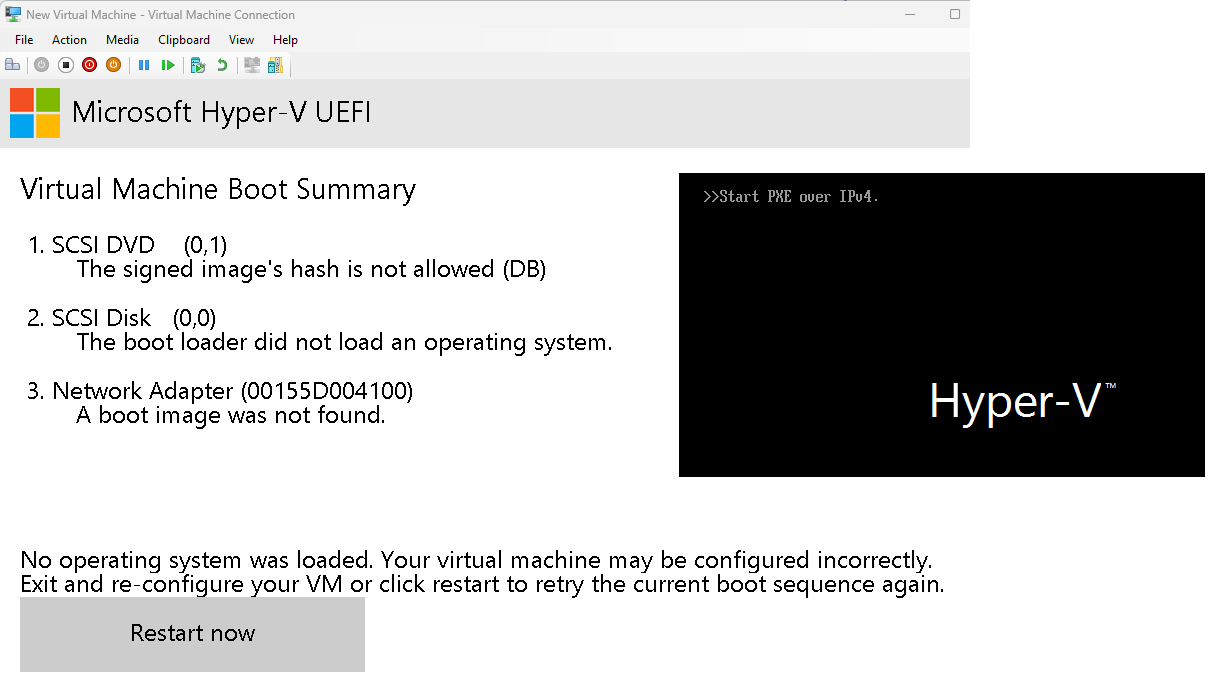
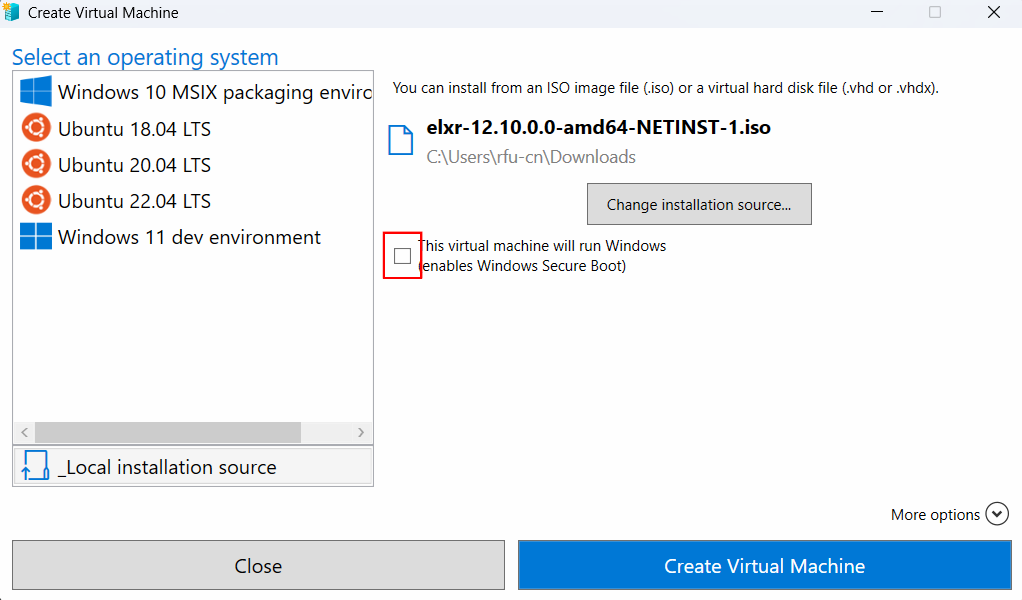
To resolve this, you must deselect the option for Secure Boot when you initially create the VM, for example:
Secure Boot requirements
Intel x86 ISO images with OSTree require that the device and eLxr image be set up initially to support Secure Boot. For details, see eLxr 12 Quick Start: Enabling Secure Boot in eLxr 12.
AppArmor audit messages appear during system startup
If you receive the following messages during startup, they are not actual system audit issues, and are instead harmless log information provided by AppArmor. You can safely ignore these messages.
[  118.316386] audit: type=1400 audit(1715915712.608:2): apparmor="STATUS" operation="profile_load" profile="unconfined" name="lsb_release" pid=424 comm="apparmor_parser"
[  118.668268] audit: type=1400 audit(1715915712.960:3): apparmor="STATUS" operation="profile_load" profile="unconfined" name="nvidia_modprobe" pid=426 comm="apparmor_parser"
[  118.669674] audit: type=1400 audit(1715915712.964:4): apparmor="STATUS" operation="profile_load" profile="unconfined" name="nvidia_modprobe//kmod" pid=426 comm="apparmor_parser"
[  119.296759] audit: type=1400 audit(1715915713.592:5): apparmor="STATUS" operation="profile_load" profile="unconfined" name="/usr/lib/NetworkManager/nm-dhcp-client.action" pid=428 comm="apparmor_parser"
[  119.297441] audit: type=1400 audit(1715915713.592:6): apparmor="STATUS" operation="profile_load" profile="unconfined" name="/usr/lib/NetworkManager/nm-dhcp-helper" pid=428 comm="apparmor_parser"
[  119.298098] audit: type=1400 audit(1715915713.592:7): apparmor="STATUS" operation="profile_load" profile="unconfined" name="/usr/lib/connman/scripts/dhclient-script" pid=428 comm="apparmor_parser"
[  119.298988] audit: type=1400 audit(1715915713.592:8): apparmor="STATUS" operation="profile_load" profile="unconfined" name="/{,usr/}sbin/dhclient" pid=428 comm="apparmor_parser"